You are running Meta Ads. You are checking dashboards every morning, pulling reports, copying numbers into spreadsheets, and trying to make sense of what the algorithm is actually doing to your budget. It is exhausting. And somewhere in the back of your mind, you know there has to be a smarter way. There is. Learning how to connect Claude to Meta with MCP server is the move that serious ecommerce brands are quietly making right now, and it is about to completely change how you interact with your ad data. This is not a future thing. This is happening today, and if you are not building this into your workflow, you are leaving real money and real time on the table.
Why Connecting Claude to Meta with MCP Server Is the Biggest Shift in Ecommerce Advertising Right Now
Most ecommerce brand owners still treat AI and their ad platforms as two completely separate worlds. They use Claude or ChatGPT to write copy, and they use Meta Ads Manager to run campaigns. The two never talk to each other. That gap is costing you hours every single week. When you connect Claude to Meta with MCP server, that gap disappears. You get a direct bridge between the most powerful AI language model available and the world’s largest social advertising platform.
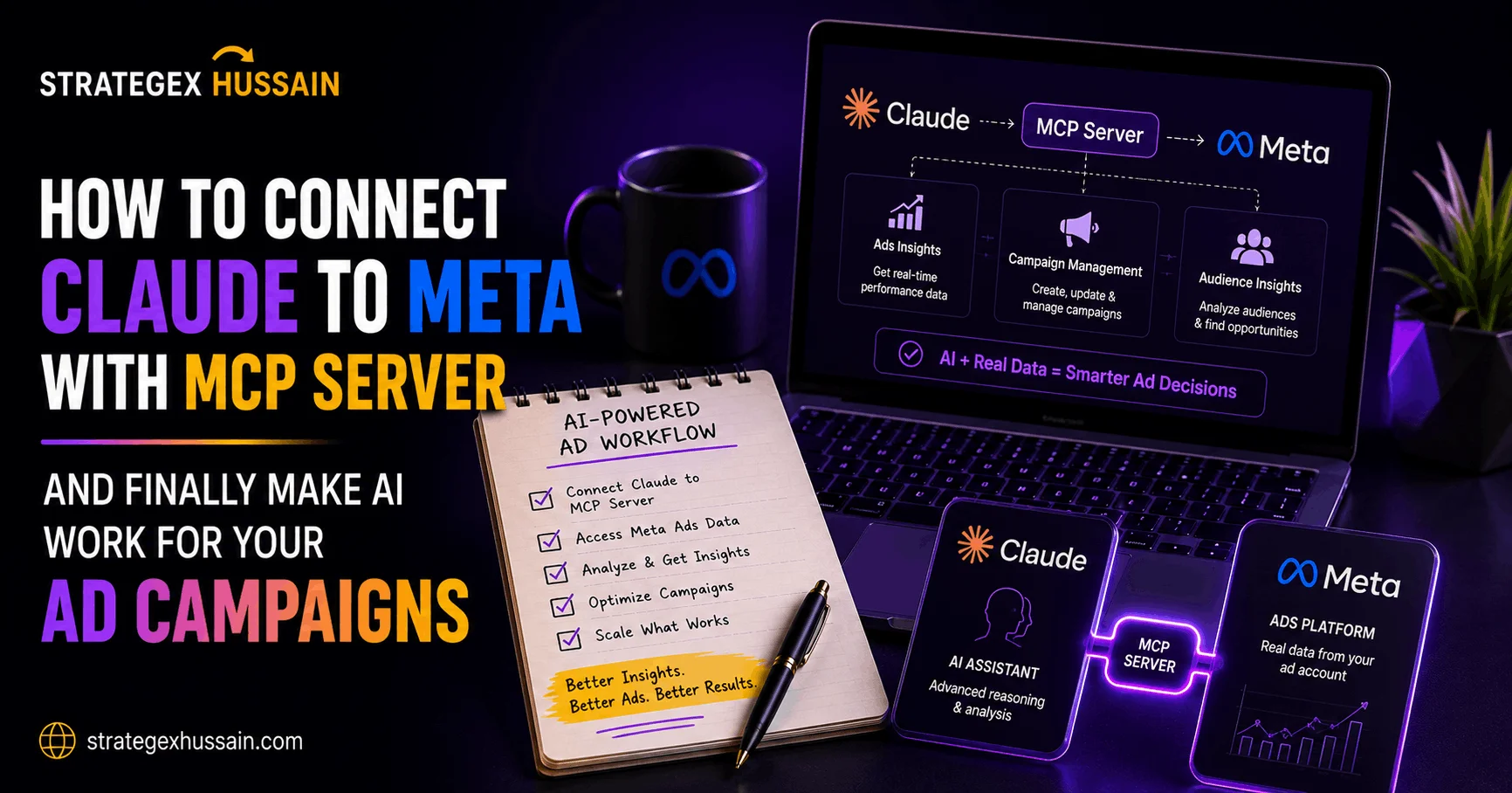
The MCP, which stands for Model Context Protocol, is an open standard developed by Anthropic that allows AI models like Claude to connect directly to external tools and data sources. Think of it as a universal adapter. Instead of you manually pulling your Meta Ads data, formatting it, pasting it into a chat, and asking Claude to analyze it, the MCP server handles all of that in the background. Claude reads your live ad data, understands your campaigns, and gives you insights in plain language. No exports. No copy-pasting. No wasted hours.
For ecommerce brands running aggressive paid media, this changes everything. Your ROAS analysis, your creative fatigue detection, your audience overlap diagnosis, your budget pacing review, all of it becomes a conversation you can have in seconds rather than a manual process that takes half your morning.
What MCP Server Actually Is and Why It Matters for Your Meta Ads
Before you start building anything, you need to understand what you are actually working with. The Model Context Protocol is not some obscure developer tool that only engineers can use. It is a structured framework that lets Claude communicate with APIs, databases, and platforms in real time. Anthropic open-sourced it specifically so that individuals and businesses could build connections between Claude and the tools they already use every day.
When you build an MCP server that connects to Meta’s Graph API, you are essentially giving Claude a live window into your ad account. Claude can read your campaign structures, pull performance metrics, analyze audience data, and surface the insights that would normally take you thirty minutes of clicking around in Ads Manager. More importantly, Claude can do this automatically and on demand, meaning you can ask it direct questions about your ads and get direct answers backed by your actual data.
The reason this matters so much for Meta specifically is that Meta’s advertising platform generates an enormous amount of data at a speed that humans simply cannot process efficiently. Ad set level metrics, creative performance breakdowns, frequency data, CPM fluctuations across audiences, placement-level ROAS, auction overlap between campaigns. All of this exists in your account right now. Most brand owners look at maybe ten percent of it because the rest is buried behind too many clicks and too many exports. The MCP server surfaces all of it through a simple conversation interface.
If you want to understand how your current Meta Ads structure is performing and why, you should also read Meta Ads vs Google Ads for Ecommerce to get the full picture of where Meta fits in your overall paid strategy.
The Technical Foundation: What You Need Before You Connect Claude to Meta with MCP Server
Let us be honest here. This is not a zero-code setup. You need some basic technical comfort to get this working. But it is far more approachable than most people assume, and the payoff is worth every minute you invest in the setup. Here is exactly what you need before you start.
A Meta Developer Account and App
The first thing you need is access to Meta’s Graph API, which requires a Meta Developer account and a registered app. Go to developers.facebook.com, create your developer account if you do not already have one, and create a new app. You want to select Business as your app type because this gives you access to the Marketing API, which is what contains your ads data.
Once your app is created, you need to add the Marketing API product to it and generate a long-lived access token with the correct permissions. The permissions you need are ads_read at minimum, and ads_management if you want Claude to eventually be able to make changes to your campaigns, not just read them. Store your access token securely. You will need it when configuring your MCP server.
Node.js and NPM Installed
Most MCP servers are built in Node.js or Python. If you are going the Node route, which is the most commonly supported path for Claude MCP integrations, you need Node.js version 18 or higher and NPM installed on your machine. You can download it from nodejs.org. Run node –version in your terminal to check if you already have it. If you get a version number back, you are good to go.
Claude Desktop App or Claude API Access
To actually use MCP servers with Claude, you either need the Claude Desktop application or access to Claude through the API. The Claude Desktop app is the most straightforward way to get started because it has a built-in MCP configuration system. You define your servers in a JSON config file, and Claude automatically connects to them when you open a new conversation.
Your Meta Ad Account ID
This seems obvious but it trips people up. Your Meta Ad Account ID is not the same as your Facebook Page ID or your Business Manager ID. It starts with the prefix “act_” in the API. Find it in your Ads Manager URL or under Business Settings. You will pass this as a parameter to your MCP server so Claude knows which account to pull data from.
Step by Step: How to Connect Claude to Meta with MCP Server
Now we get into the actual build. Follow these steps carefully and you will have a working Claude to Meta connection that you can use every single day to run your ecommerce ad operation more intelligently.
Step One: Set Up Your Meta App Permissions
Log into your Meta Developer dashboard and navigate to your app. Under the Products section, find the Marketing API and add it. Once added, go to Marketing API and then to Tools. Here you will find the API Access Token section. Generate a User Access Token and make sure you check the boxes for ads_read and business_management. If you want read and write capabilities, also add ads_management.
The token you generate here will expire. For a production setup, you want to exchange this short-lived token for a long-lived one using the token exchange endpoint in the Graph API. Long-lived tokens last about 60 days. For a more permanent solution, you eventually want to implement a System User in Business Manager, which generates tokens that do not expire. For now, the long-lived user token is enough to get started.
Step Two: Create Your MCP Server Project
Open your terminal and create a new directory for your MCP server project. Name it something clear like meta-ads-mcp. Navigate into it and run npm init -y to create your package.json file. Then install the MCP SDK with the command npm install @modelcontextprotocol/sdk. You also want to install the axios package for making HTTP requests to the Meta Graph API, so run npm install axios as well.
Create a new file called index.js in your project root. This is where your MCP server logic will live. The basic structure of an MCP server involves defining tools that Claude can call, and then implementing the logic for what each tool actually does when Claude calls it.
Step Three: Define Your Meta Ads Tools
Inside your index.js file, you will define the tools you want Claude to be able to use. For a Meta Ads integration, the most useful tools to start with are a get_campaigns tool that fetches all campaigns in your account with their status and objective, a get_campaign_insights tool that pulls performance metrics like spend, impressions, clicks, conversions, and ROAS for a given date range, a get_adsets tool that returns all ad sets within a specific campaign, and a get_creative_performance tool that compares performance across different ad creatives.
Each tool definition tells Claude what the tool does, what parameters it accepts, and what data it returns. When you have this defined clearly, Claude can reason about which tool to call based on the question you ask it in natural language. You ask “how are my retargeting campaigns performing this week” and Claude figures out it needs to call get_campaign_insights with the right filters and date range, runs the tool, and brings the data back to you as a plain English analysis.
Step Four: Implement the Graph API Calls
For each tool, you write the actual function that calls Meta’s Graph API. The base URL for the Graph API is https://graph.facebook.com/v18.0. Your access token gets appended as a query parameter on every request. For the get_campaign_insights tool, your API call will hit the endpoint /act_YOURADACCOUNTID/insights and you will pass fields like spend, impressions, clicks, actions, cost_per_action_type, and purchase_roas as query parameters. You also pass your date_preset or a custom time_range object to specify the period you want data for.
The Graph API returns JSON, so your tool function processes that JSON and returns a clean structured object that Claude can interpret and explain to you. Keep the data structure simple and labeled clearly. Claude is excellent at interpreting data but you want to make it easy for it by labeling fields with human-readable names.
Step Five: Configure Claude Desktop to Use Your MCP Server
This is the step that actually connects everything. Open your Claude Desktop application and navigate to its configuration file. On Mac, this is typically found at ~/Library/Application Support/Claude/claude_desktop_config.json. On Windows it is at %APPDATA%\Claude\claude_desktop_config.json.
Open this file in a text editor and add your MCP server to the mcpServers object. You give your server a name, specify the command to run it (node), and provide the full path to your index.js file. Save the file and restart Claude Desktop. When it reloads, it will automatically connect to your MCP server. You will see a small icon in the Claude interface indicating active tool connections.
Step Six: Test Your Connection
Open a new Claude conversation and type a simple request like “Pull my active Meta campaigns and tell me which ones are currently running.” If your setup is correct, Claude will call your get_campaigns tool, retrieve your live campaign data, and respond with a structured summary of your active campaigns. That first successful call is the moment when the whole thing clicks. You will feel it immediately.
What You Can Actually Do Once You Connect Claude to Meta with MCP Server
Setup is one thing. But the real value is in how you actually use this connection day to day. Let me walk you through the specific workflows that will save you the most time and make your Meta Ads operation meaningfully smarter.
Daily Performance Briefings
Every morning instead of logging into Ads Manager and clicking through campaigns one by one, you open Claude and ask “Give me a performance summary for all active campaigns in the last 48 hours, flag anything that has ROAS below 2x or CPM above threshold.” Claude pulls the data, runs the comparison, and delivers a structured morning briefing in about ten seconds. What used to take twenty minutes of dashboard navigation is now a single sentence.
Creative Fatigue Detection
One of the most underutilized applications is asking Claude to compare frequency data against CTR and conversion rate trends across your ad creatives. When frequency climbs above 3 and your CTR is dropping simultaneously, that is creative fatigue. Claude can identify this pattern across all your running ads in one shot and tell you exactly which creatives need to be refreshed. Pair this with the copywriting frameworks from How to Write Meta Ads Copy That Actually Converts and you have a complete creative refresh system.
Budget Pacing Analysis
How much have you spent so far this month? What percentage of your monthly budget is that? Are you pacing ahead or behind? These questions take thirty seconds to answer manually but they are questions you ask yourself multiple times a day when you are managing serious ad spend. With your MCP connection, you ask Claude and it calculates pacing in real time against whatever budget benchmarks you give it.
Audience Overlap and Campaign Cannibalization
If you are running multiple campaigns targeting overlapping audiences, they are bidding against each other in the same auction. This drives up your CPMs and kills your efficiency. Claude can pull your audience data across campaigns and flag where overlap is likely occurring, giving you actionable recommendations for restructuring your ad account. This single insight alone can improve your ROAS significantly without touching your creative or budget. For more on this, see our guide on How to Improve ROAS for Ecommerce.
Advanced Strategies for Getting More from Your Claude Meta MCP Integration
Once the basic connection is working and you are comfortable with it, there is a second level of capability that most people never reach. These advanced strategies are where the real competitive advantage lives.
Building Custom Reporting Prompts
Instead of typing the same questions to Claude every day, build a library of saved prompts that you can run on demand. Your weekly campaign review prompt, your creative performance comparison prompt, your audience analysis prompt. These become reusable workflows that any team member can run without needing to know anything about the Meta API or how the data is structured. You are essentially building a custom reporting interface powered by Claude.
Connecting Trend Data with Creative Strategy
One of the most powerful things you can do is combine your Meta performance data with Claude’s creative intelligence. Pull your top performing creatives and their metrics, then ask Claude to analyze what they have in common, what patterns emerge in the copy, the offers, the visuals, and how you can replicate those patterns in new creative. You are not just analyzing what worked. You are building a creative brief from the data itself.
Setting Up Automated Alerts
With a bit more development work, you can set up scheduled jobs that run your MCP server automatically at defined intervals, check your campaign metrics against thresholds you set, and trigger alerts when something falls outside of normal range. Your CPA spikes overnight. Your best performing campaign runs out of budget at noon. Your top creative hits a frequency of 4. All of these become automated alerts rather than things you discover too late by manually checking the dashboard.
Multi-Account Management
If you manage multiple ad accounts, either for different brands you own or for clients, the MCP approach scales beautifully. You parameterize the account ID in your tools, and Claude can pull data from any account you have access to simply by passing the right ID. What would normally require logging in and out of different accounts becomes a single conversation where you can compare performance across all of them simultaneously.
Common Mistakes to Avoid When Setting Up Your Claude to Meta MCP Connection
Building something new always comes with landmines. Most people hit the same few mistakes when they first set this up, and knowing them in advance will save you significant frustration.
Using Short-Lived Tokens in Production
The access token Meta gives you by default when you generate one in the developer dashboard expires in about an hour. If you hardcode that into your MCP server and walk away, it will stop working before you finish your lunch. You need to either implement the token refresh flow in your server code or use a System User token through Business Manager, which does not expire. Get this right from day one.
Requesting Too Many Fields at Once
The Meta Graph API has rate limits, and if you build tools that pull too much data in a single request, you will hit those limits fast. Start with the fields you actually need for each specific use case. You do not need every possible metric in every API call. Build lean tools that do specific things well, and add more fields as you identify the need for them.
Not Handling API Errors Gracefully
The Meta API returns errors for all kinds of reasons. Rate limits, permission issues, invalid parameters, accounts that are flagged, campaigns that no longer exist. If your MCP server does not handle these errors and pass them back to Claude in a readable format, Claude will have no useful information to give you and you will be left debugging in the dark. Build proper error handling from the start so Claude can tell you clearly when something goes wrong and why.
Ignoring Data Freshness
Meta’s reporting API has a data delay. The numbers you pull are not always real-time, especially for conversion data which can have a delay of up to 24 to 48 hours due to the attribution window. If you ask Claude about yesterday’s conversion numbers and the data is still processing, you could make bad decisions based on incomplete numbers. Always factor in this delay when interpreting conversion and ROAS data through your MCP integration.
Building Tools That Are Too Broad
It is tempting to build one giant tool that pulls everything and let Claude sort it out. Resist that urge. Specific tools with clear purposes work better because they give Claude cleaner input to reason from. A tool called get_campaign_insights that returns ten specific metrics is far more useful than a tool called get_everything that dumps raw API responses. Design your tools the way you would design a good dashboard: focused, purposeful, and easy to read.
Your Action Plan: How to Get This Running This Week
Let us make this concrete. Here is a realistic plan for getting your Claude to Meta MCP connection live in seven days or less.
On day one, set up your Meta Developer account and create your app. Add the Marketing API product, generate your access token with ads_read permissions, and test that it works by making a simple API call from the browser using the Graph API Explorer tool inside the developer dashboard. This confirms your permissions are set correctly before you write a single line of code.
On day two, install Node.js if you do not have it, create your project directory, initialize your npm project, and install the MCP SDK and axios. Write a basic index.js file that just starts the MCP server and returns a hello world response. Confirm it runs without errors.
On day three, build your first real tool, the get_campaigns tool. Write the Graph API call, test it independently, and verify that it returns your actual campaign data in a clean format. Do not move on until this one works perfectly.
On day four, build your get_campaign_insights tool with a date range parameter. This is your highest value tool because it is what you will use every single day for performance reviews. Test it with several different date ranges and confirm the numbers match what you see in Ads Manager.
On day five, configure your Claude Desktop app to recognize your MCP server by updating the config file. Restart Claude and verify the connection. Run your first natural language query against your live campaign data.
On day six, build two to three additional tools based on your most common Ads Manager tasks. Creative performance comparison, ad set level breakdown, audience data review. Each new tool you add makes the system more powerful.
On day seven, run your full morning performance review using Claude instead of Ads Manager. Time it. Compare it to your old manual process. The difference will be immediately obvious.
How This Changes Your Overall Ecommerce Marketing Operation
Zooming out from the technical details, think about what this actually means for how you run your business. Right now, data analysis is a bottleneck. The information you need to make good decisions is locked inside dashboards that require time and attention to navigate. You are the constraint in your own operation because there are only so many hours in a day and only so much data you can manually process.
When you connect Claude to Meta with MCP server, you remove yourself as the bottleneck. The data analysis becomes instant. The insights become conversational. You stop spending your best mental energy on reading dashboards and you start spending it on strategy, creative direction, and the higher-level decisions that actually move the needle. That is a fundamental shift in how you operate as an ecommerce brand.
This is also relevant if you are managing a team. Instead of being the only person who can make sense of the Meta data, you now have an interface that any team member can query in plain language. Your media buyer can pull their own performance reports. Your creative team can see which ad formats are winning without waiting for you to run an analysis. Your whole operation gets smarter.
For brands serious about scaling through paid media, this kind of infrastructure is not optional anymore. The gap between brands that use AI intelligently and brands that do not is going to widen very fast over the next twelve months. You want to be on the right side of that gap. If you want help building this kind of system for your brand, the team at Strategex Hussain helps ecommerce brands do exactly this. You can check out the full range of digital marketing services here.
Frequently Asked Questions
Do I need to know how to code to connect Claude to Meta with MCP server?
You need basic comfort with the command line and some familiarity with JavaScript or Python, but you do not need to be a professional developer. The MCP SDK is well documented and there are growing resources online for building Meta-specific MCP servers. If you can follow a tutorial and run commands in a terminal, you can get this working. Alternatively, a developer can build and configure the server for you in a few hours, and you just use it through the Claude interface.
Is connecting Claude to Meta Ads against Meta’s terms of service?
No. You are using Meta’s official Marketing API through a registered developer app that you own. This is exactly what the API is designed for. Businesses use the Marketing API to build custom reporting tools, agency dashboards, and automation systems all the time. As long as you are accessing your own ad account data with proper authorization and not violating Meta’s data use policies, you are completely within the terms of service.
What kind of data can Claude actually access through the MCP server?
With ads_read permissions, Claude can access campaign structure, ad set settings, creative details, audience definitions, and performance metrics including spend, impressions, reach, clicks, conversions, ROAS, frequency, CPM, CPC, CPA, and placement breakdowns. With ads_management permissions added, Claude can also make changes to campaigns such as adjusting budgets, pausing campaigns, and updating targeting. Most users start with read-only access and expand from there.
How much does it cost to set this up?
The Meta Marketing API is free to use for accessing your own ad account data. The MCP SDK is open source and free. Claude Desktop is included with a Claude subscription. The main costs are your time to build the integration, and if you hire a developer to do it for you, that is typically a few hundred to a few thousand dollars depending on complexity. There are no ongoing API fees for standard usage volumes.
Can I use this for multiple Meta ad accounts?
Yes. If your developer app has access to multiple ad accounts, either through Business Manager or through direct account access, you can parameterize your MCP tools to work with any of them. This is particularly powerful for agencies managing multiple clients or for brand owners with multiple ecommerce brands running on separate ad accounts. You can compare performance across all accounts in a single Claude conversation.
What is the difference between using MCP server versus just copying data into Claude manually?
When you copy data manually, you are limited to what you think to copy and what you have time to copy. The data is static, meaning it reflects a specific moment in time and you have to repeat the process every time you want fresh insights. With the MCP server, Claude has live access to your account data on demand. You can ask follow-up questions that go deeper into the data without doing any additional manual work. The difference in speed, depth, and frequency of analysis is enormous.
Conclusion: The Brands That Figure This Out First Will Win
You just read four thousand words about how to connect Claude to Meta with MCP server. That means you are serious about using AI to run smarter ad campaigns. Most people will read something like this, nod their head, and do nothing with it. They will keep spending their mornings clicking through Ads Manager, copying numbers into spreadsheets, and missing the signals that are hiding in their data.
You do not have to be one of those people. The setup is approachable. The payoff is real. And the brands that build this infrastructure now will have a genuine operational advantage over the ones that wait until it becomes standard practice. By then, the early movers will already be running circles around everyone else.
So here is the challenge for you: before this week is over, log into your Meta Developer account and create your app. Just that one step. See how it feels. The rest follows naturally once you start.
And if you want a team that already understands how to combine this kind of technical infrastructure with serious paid media strategy to grow your ecommerce brand, that is exactly what Strategex Hussain does. Get your free proposal here and let us show you what a properly connected, AI-powered ad operation looks like for your brand.